
Built in Sydney for Australian flight schools
Run the whole flight school from one screen
Aircraft, instructors, and students on one calendar. CASA syllabuses already loaded. Logbooks, prepaid hours, GST invoices, and Xero - without the spreadsheets in between.
- Ten CASA training programs pre-built, from RPL to CPL
- Hobbs-based billing that draws down prepaid hour packages
- AI reads licences and medicals, then chases the renewals
- GST tax invoices and a properly mapped Xero connection
No card required. Your training programs and lesson catalogue are ready on first sign-in.
Flight line
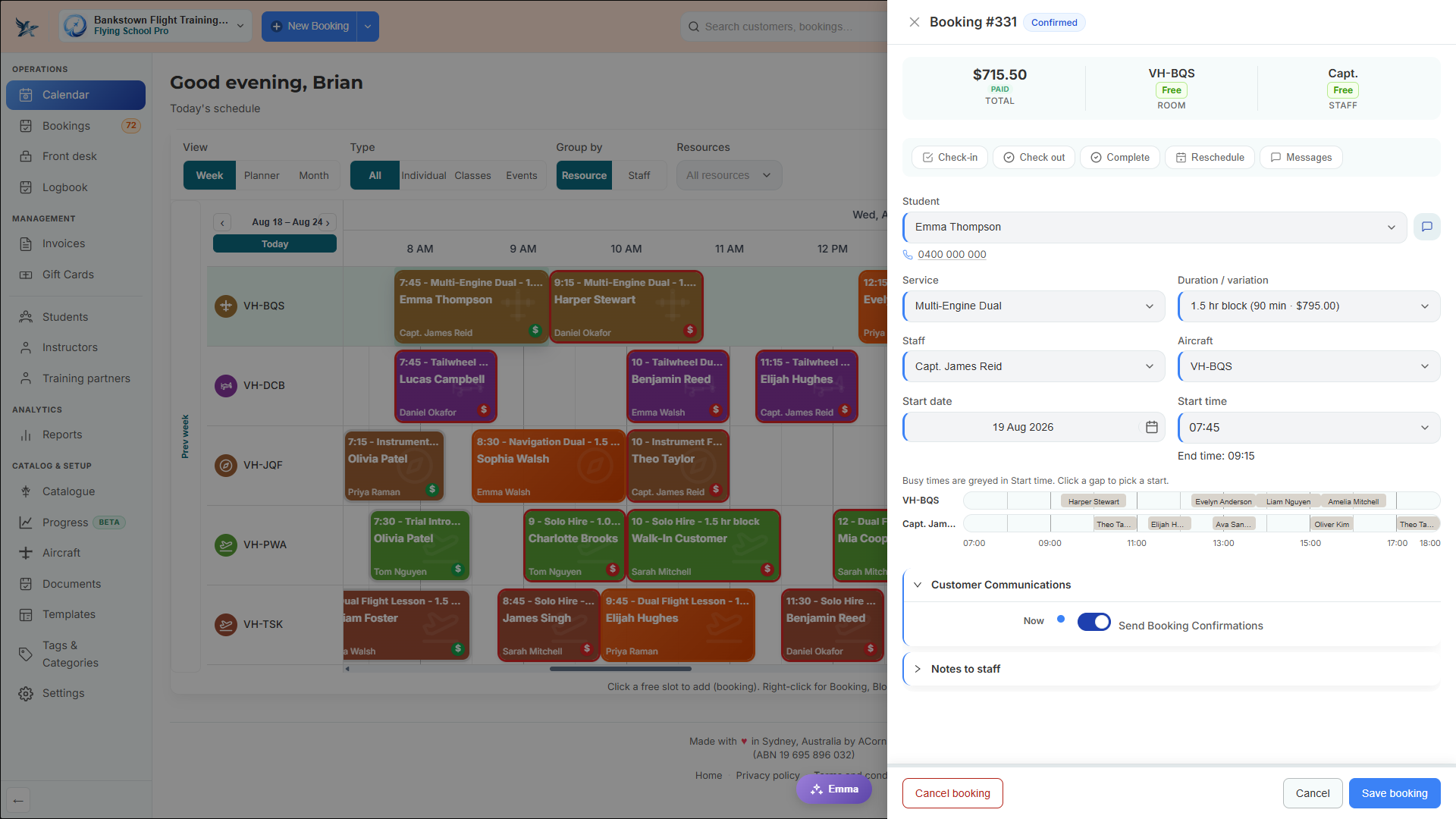
One calendar that understands aviation
Each row is an aircraft. Each booking carries its student and instructor. The busy-time strips show you both availabilities before you commit to a slot.
Scheduling
Book the aircraft and the instructor together
A general scheduler books one resource. A flight lesson needs two, plus a lesson type that only fits certain airframes. Flying School handles all three, and refuses the booking when the aircraft is due for maintenance or the instructor is not rated on the category.
- Week, planner, and month views, grouped by aircraft or instructor
- Aircraft and instructor busy times shown on one timeline while you pick a start
- Maintenance-due Hobbs blocks the booking, not the instructor
- Instructor aircraft-category ratings enforced from approved licence documents
- Confirmations sent to the student automatically
Checkout
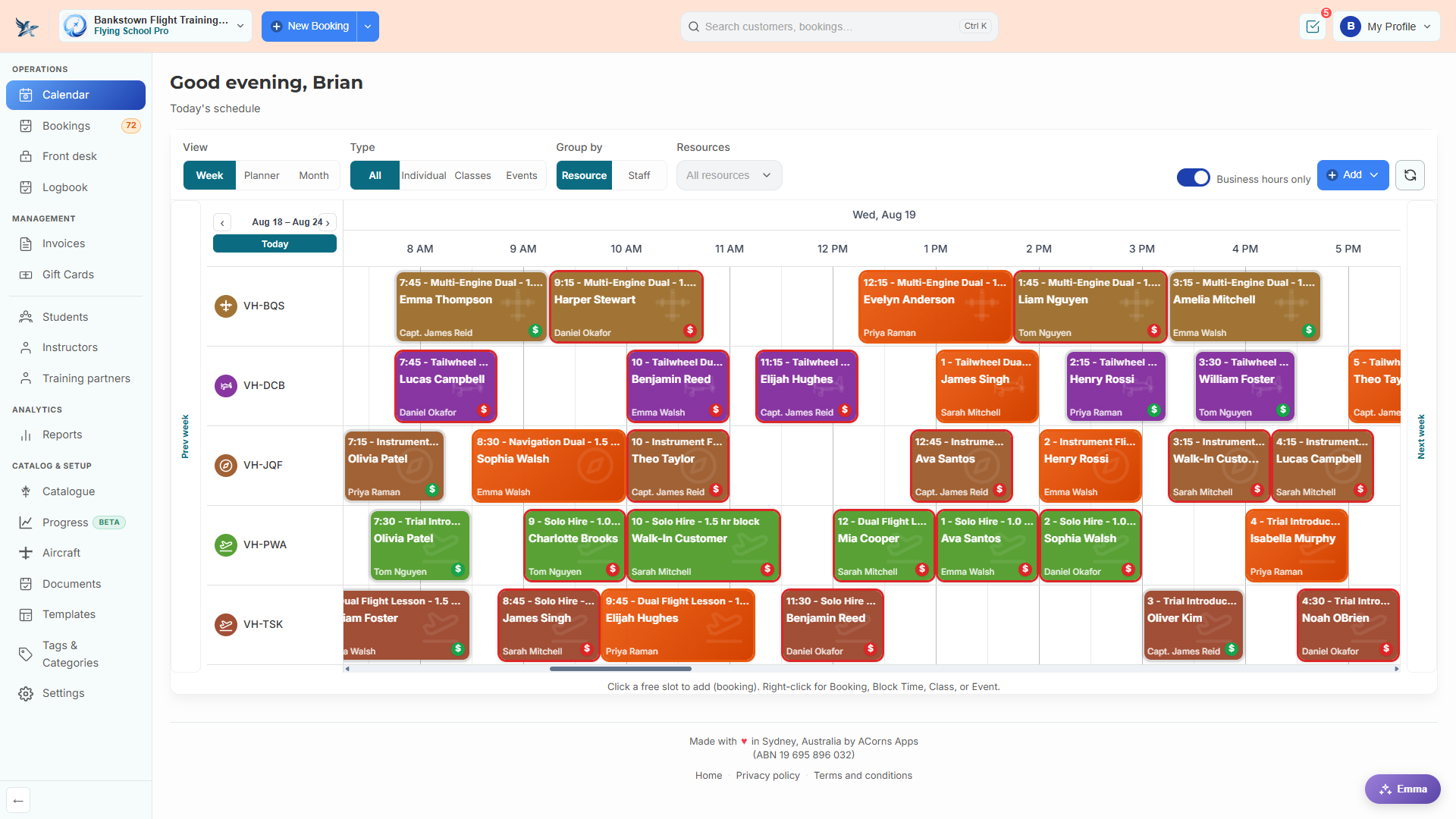
Log it, grade it, and invoice it in one drawer
At the end of the sortie the instructor records Hobbs and tach, day and night time, and landings, grades the syllabus lessons flown, and settles the invoice - drawing package hours first, then the account balance, then charging the difference.
- Billable hours from the Hobbs delta, not the diary slot
- Day and night time, landings, departure and arrival, and a squawk flag
- Package hours drawn on the time actually flown, with overage repriced
- Flight log snapshotted onto the invoice line
- Save a draft mid-debrief and finish it later
Nobody else ships this
Your CASA syllabus is already in there
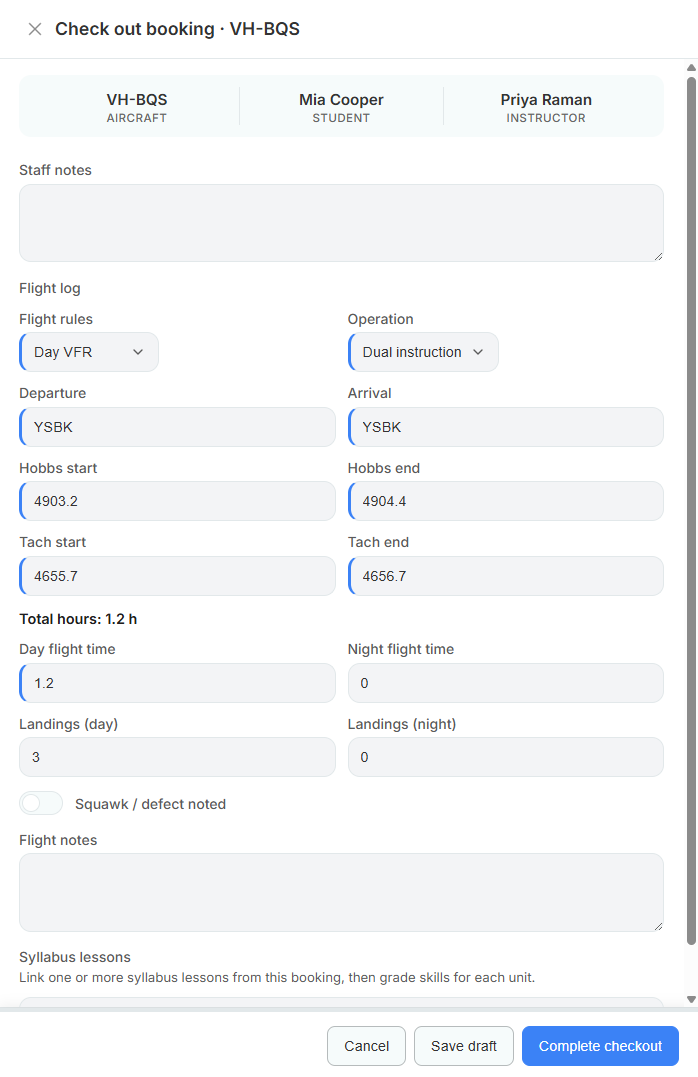
Most flight school software hands you an empty progression module and wishes you luck. Ten CASA training programs arrive built out - stages, lessons, units of competency, and milestones, mapped to the Part 61 Manual of Standards. Fly them as they are, or edit every line.
Licences
- RPL Recreational Pilot Licence
- PPL Private Pilot Licence
- CPL Commercial Pilot Licence
Ratings
- NVFR Night VFR rating
- Instrument Rating Single and multi-engine aeroplane
- MEA Class Rating Multi-engine aeroplane class
Endorsements
- MPPC Manual propeller pitch control
- Formation Formation flight endorsement
- Tailwheel Tailwheel undercarriage endorsement
- UPRT Upset prevention and recovery training
Down to the unit of competency
The PPL program alone arrives with five milestones, ten pre-solo lessons, and 21 units of competency - each one carrying its MOS reference and a target score.
- Stages and modules, with lesson durations and required flags
- Units of competency such as A3.1, C2, and NTS1.1
- Milestones for pre-solo air law, the CASR 61.114 medical, and the GEL assessment
- Restore defaults at any time, or build a program from scratch
Training records
Every flight updates the student's record
Grading happens during the debrief, not in a spreadsheet three days later.
Grading
Score the units of competency while it is fresh
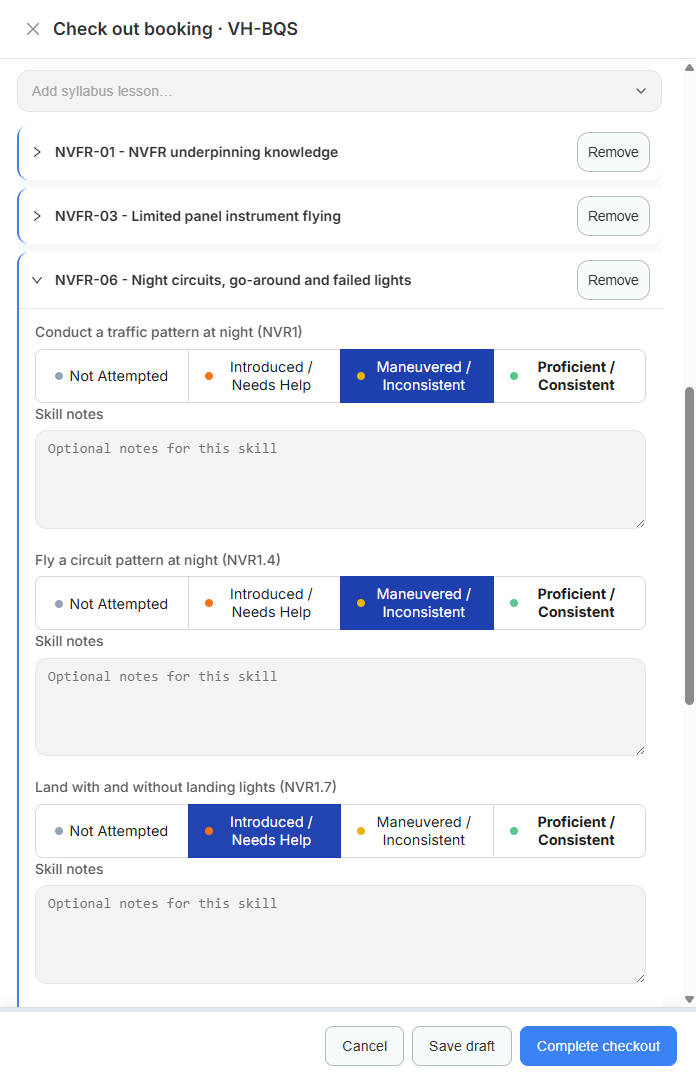
Attach the syllabus lessons flown to the booking you are checking out, then score each unit of competency on a four-point rubric with notes against the individual skill. The student's record updates itself.
- Not Attempted, Introduced / Needs Help, Maneuvered / Inconsistent, Proficient / Consistent
- Rubric scale, labels, and colours configurable per school
- Per-skill notes captured during the debrief
- Lesson recorded as passed or needs repeat
Progress
See exactly where every student sits
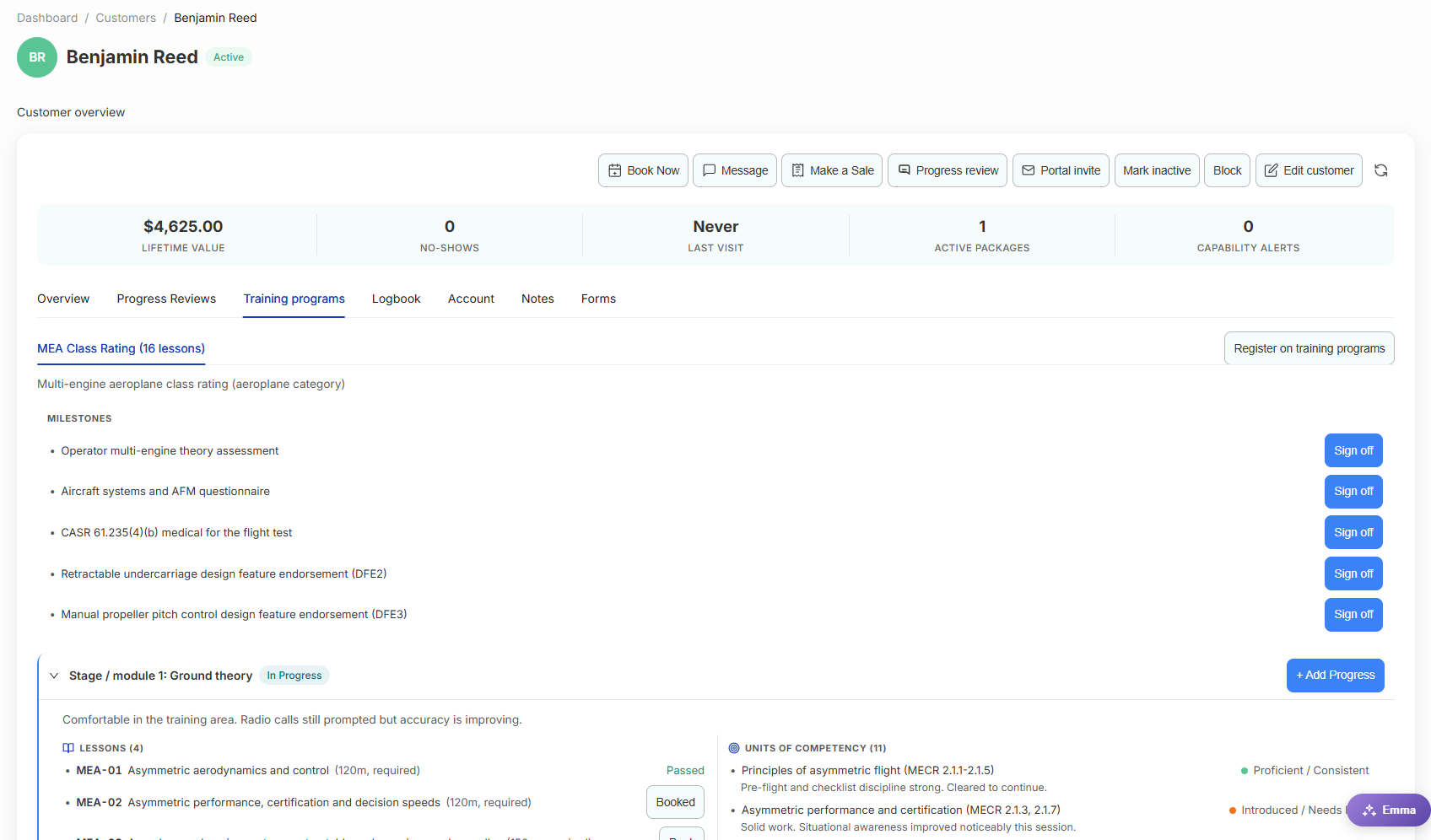
Open a student and their programs, milestones, stages, lessons, and unit scores are all on one tab - with the instructor's notes attached to the skill they were written about. The dashboard rolls it up and tells you who is ready to progress.
- Multiple concurrent programs per student
- Milestone sign-offs for medicals, exams, and design feature endorsements
- Stage status showing In Progress, Ready to progress, or Completed
- Ready-to-promote counts across the whole school
Logbooks
One entry fills three logbooks
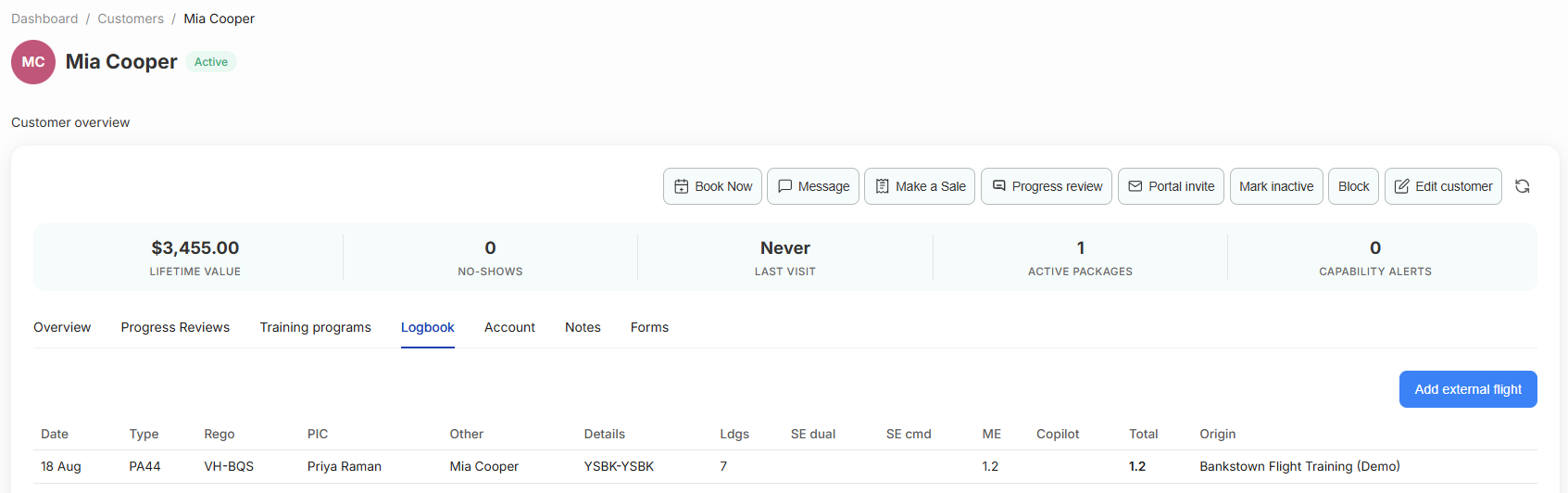
The flight log you record at checkout rolls the aircraft's Hobbs and tach forward, writes the student's logbook line, and writes the instructor's - with hours dropped into the correct CASA columns for single-engine and multi-engine, dual, command, ICUS, copilot, and instrument.
- CASA-format hour columns, not a generic time field
- Aircraft meters roll forward automatically on completion
- Instructor logbook built from the same entry
- External flights can be added so hours flown elsewhere still count
Paperwork
The licences and medicals read themselves
Then they chase their own renewals, so nobody discovers a lapsed medical on the apron.
Document AI
Upload a medical, get the ARN and the expiry
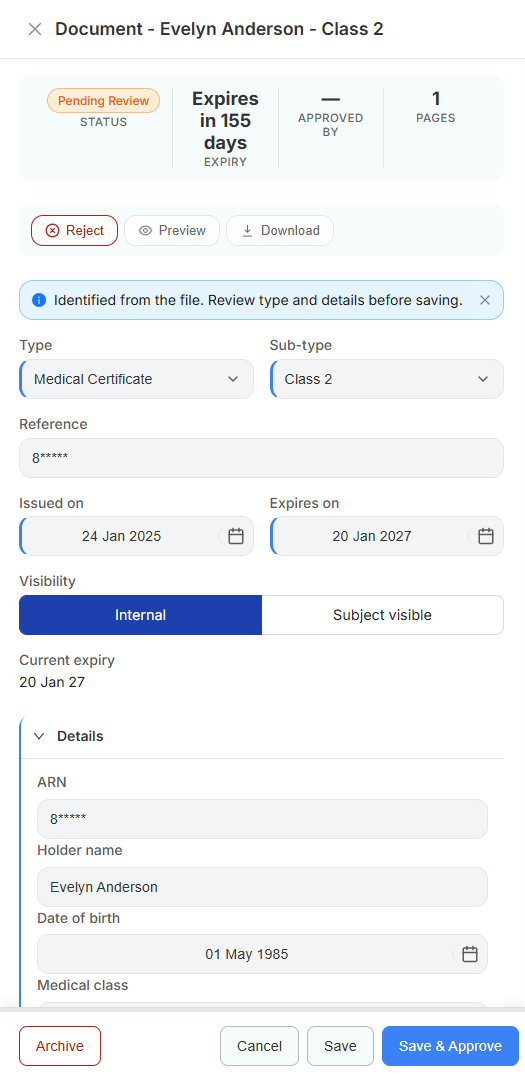
The file is identified as a CASA Part 61 licence or a CASA medical certificate, and the holder name, ARN, date of birth, class, issue date, and expiry are read out and presented for review. A person approves it - the AI never files anything on its own.
- Automatic identification of CASA licences and medical certificates
- Holder name, ARN, date of birth, class, issued and expiry extracted
- Everything lands in Pending Review for a human to approve or reject
- Approved documents grant capabilities such as instructor category ratings
- Reminders at 60, 30, and 7 days before expiry, and again on the day
Selling hours
Flight training is sold in blocks, so that is how it is billed
Packages built from hours of named services, drawn down against the Hobbs time actually flown.
Packages
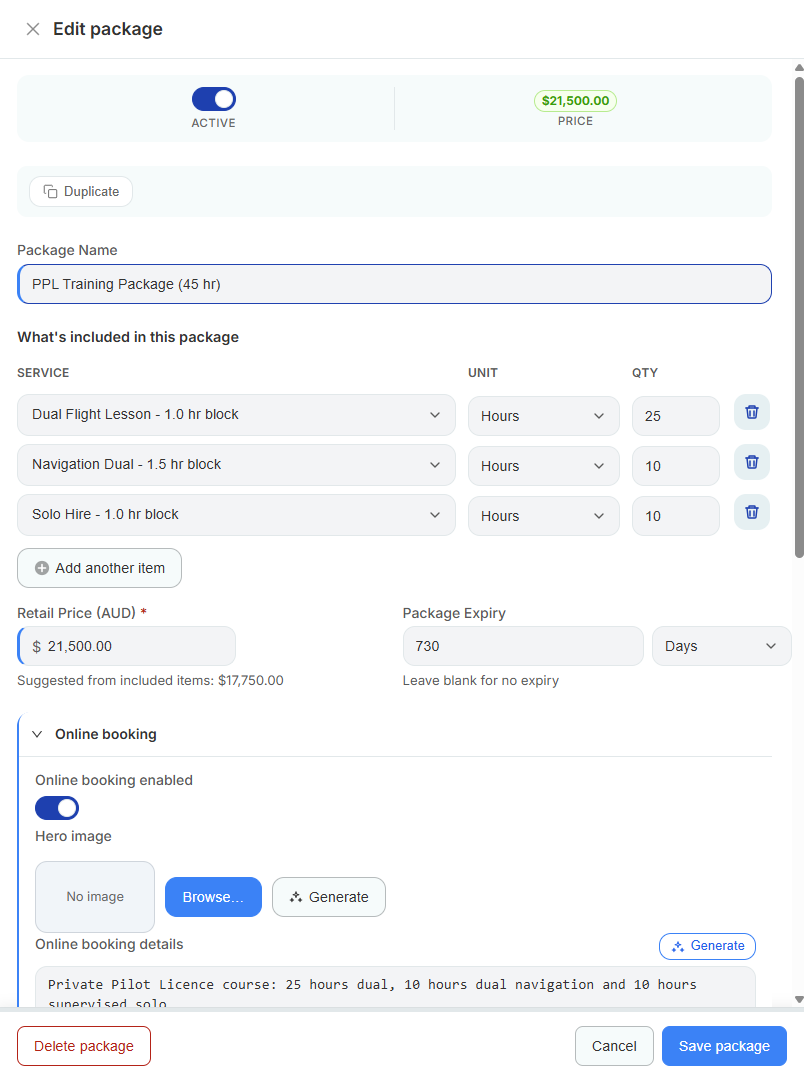
A 45-hour PPL package that knows what is left
Build the package from what it contains - 25 hours of dual, 10 hours of navigation dual, 10 hours of solo hire - set a retail price and an expiry, and the hours draw down as the student flies. Overage past the package is repriced at the hourly rate on the same invoice.
- Hours of specific services, not a dollar balance
- Suggested price from the included items, with your retail price on top
- Oldest package drawn first, with a dated usage history
- Preferred instructor set on the package and defaulted into bookings
- Student account balances for schools that prefer top-ups
- Sell packages online through the student portal
Balances
Answer the question students always ask
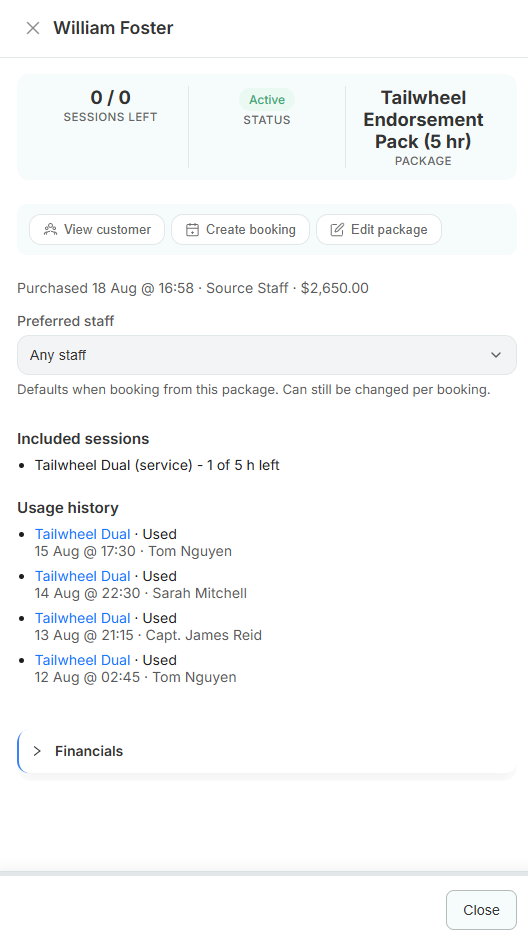
How many hours have I got left? It is on the screen, with every draw dated and attributed to the instructor who flew it.
- Hours remaining per included service
- Usage history with dates and instructors
- Expiry tracked from the purchase date
- Financial detail available on the same drawer
Australian money
The tax and accounting bit, done here rather than worked around
Overseas platforms treat GST as a configurable tax rate and Xero as a CSV download. Neither survives a BAS quarter.
GST that behaves
Flag the account as GST registered and the 10% and GST-free rates are created. Prices display GST inclusive the way Australian customers expect, and the GST is split out correctly on every invoice line.
Your ABN on the tax invoice
ABN lookup pulls your business name and GST registration status from the ABR, and it prints on the invoice PDF under the words Tax Invoice.
Xero mapped, not exported
Connect by OAuth, map your real chart of accounts and your real Xero tax rates, then sync a clean daily summary or individual invoices and payments. Coded so the BAS reconciles.
How it works
From sign-up to first booking in an afternoon
-
Add your fleet
Each airframe and simulator becomes a bookable resource with its registration, category, ICAO type, and current Hobbs.
-
Roster your instructors
Working hours and base locations set availability. Ratings come from their approved licence documents.
-
Check the catalogue
Lessons, hire, and packages arrive pre-filled. Adjust the durations and prices to match your board.
-
Take the first booking
Book from the calendar or share your portal link. Check out after the flight to log, grade, and invoice in one drawer.
Comparisons
Already using something else?
Honest, specific comparisons with the tools Australian flight schools actually run - including where the other product is the better choice.
vs Flight Schedule Pro
A capable US flight school platform - built around FAA training and US accounting.
Read the comparison →vs Flight Circle
Simple, well-liked US scheduling and billing - light on training records.
Read the comparison →vs Flight Logger
Strong European training records platform - built around EASA, not CASA.
Read the comparison →vs Smart Aviation
Aviation operations software aimed at larger organisations - enterprise pace, enterprise process.
Read the comparison →vs Avinet
Aviation quality, safety, and compliance management - a different job to running a school.
Read the comparison →vs Aviacore
European flight school management - the right shape, the wrong jurisdiction.
Read the comparison →Common questions
Do we have to build our own syllabus?
No. Ten CASA training programs ship with the product - RPL, PPL, CPL, night VFR, instrument rating, multi-engine class rating, and the MPPC, formation, and tailwheel endorsements, plus a UPRT course. Each one arrives with stages, lessons, units of competency, and milestones already built. Edit them, or restore the defaults whenever you want.
Where is our data stored?
In Sydney. The application and its database run in Australia, which means your students' records and documents stay onshore.
How good is the Xero integration really?
You connect by OAuth, then map your actual Xero chart of accounts and your actual Xero tax rates - we suggest the matches. From there you choose a sync mode: a single daily summary invoice, or individual invoices as they are sent or paid. Payments and credit notes go across too, and there is a retry queue so a Xero outage does not lose a transaction.
What does the AI actually do with documents?
Upload a CASA Part 61 licence or a CASA medical certificate and it identifies the document type and reads out the holder name, ARN, date of birth, class, issue date, and expiry. Everything lands in a review queue for a person to check and approve - the AI never files anything on its own. Once approved, the document grants the matching capability and starts its expiry countdown.
Can students book and pay online?
Yes. Your school gets a branded portal where students book against real aircraft and instructor availability, buy training packages, pay by card, enrol in ground theory classes, and upload their paperwork.
How long does it take to get going?
Start a trial and the CASA programs, a lesson catalogue, and the categories are already there. Add your aircraft and instructor roster and you can take a booking the same afternoon. Students and history come across by CSV, and we will help with the mapping if the export from your current system is awkward.
See it with your own aircraft and syllabus
Start a free trial and your CASA training programs, lesson catalogue, and aircraft are ready to go. No card required.